
When Microsoft Defender Misses Phishing: Understanding Header-Level Impersonation
Even when SPF, DKIM, DMARC, and Domain Impersonation protection are correctly configured, subtle header tricks let attackers impersonate your internal brand.
Even when SPF, DKIM, DMARC, and Domain Impersonation protection are correctly configured, subtle header tricks let attackers impersonate your internal brand.
Introduction
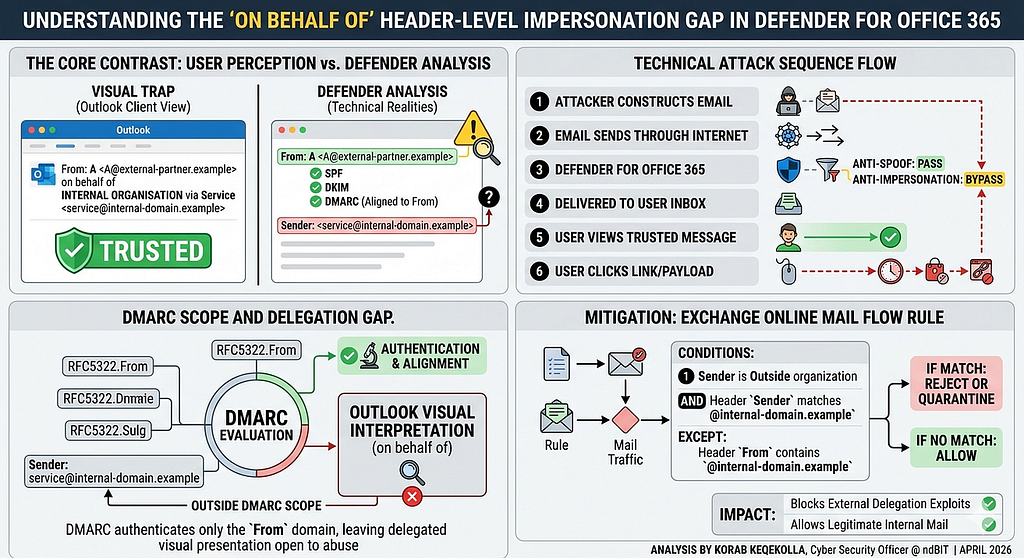
Microsoft Defender for Office 365 is great, but ‘Out-of-the-Box’ settings often leave a massive gap in how identity is rendered to the end user. Emails that look like they come from trusted internal senders aren’t always safe. During a recent phishing investigation, I discovered a real-world attack that bypassed all Microsoft Defender for Office 365 protections.
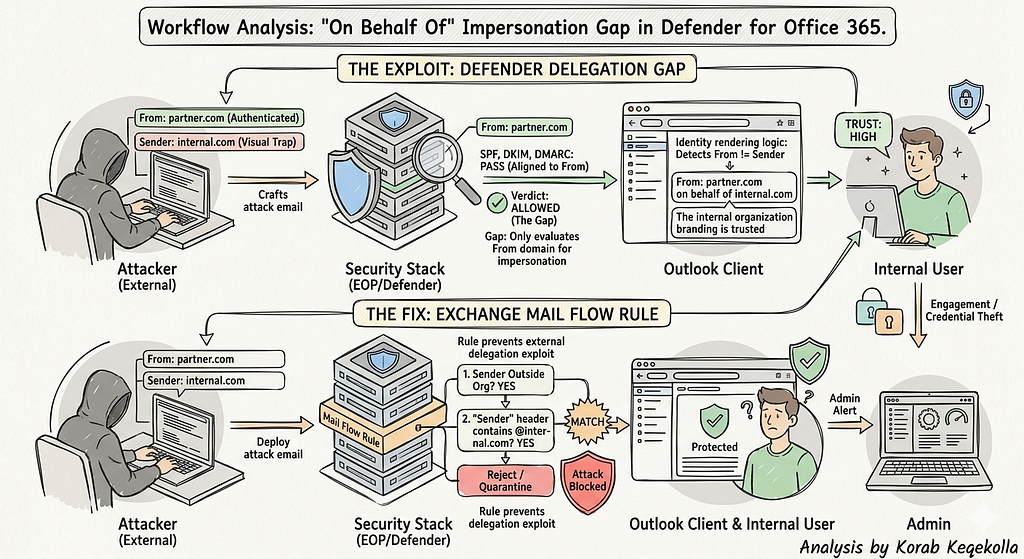
The attack exploited the difference between the From: and Sender: headers, combined with Outlook’s “on behalf of” rendering. Even though authentication passed and Defender evaluated the sender correctly, the email visually appeared to users as if it came from a trusted internal source — making it much more likely they would click links or take action.
This article explains how the attack worked, why Defender didn’t block it, the impact, and how to protect your organization.
Environment Context
Platform: Microsoft 365 / Exchange Online
Security stack:
- Exchange Online Protection (EOP): Enabled
- Microsoft Defender for Office 365: Enabled
- Impersonation protection: Enabled
- Protected internal domain: internal-domain.example
- DMARC policy for internal domain: p=reject
How the Attack Looked to Users
Recipients saw an email like this:
From: user@external-partner.example
on behalf of
Internal Organisation via E-Signature Service <service@internal-domain.example>
This made it look like:
- The email was from the internal organization
- It was sent through a trusted e-signature service
- The sender was acting in an authorized, delegated capacity
Result: Users trusted the email more and were more likely to engage.
What Was Really Happening
Despite the visual appearance:
- RFC5322.From: external-partner.example
- SPF: Pass (external-partner.example)
- DKIM: Pass (external-partner.example)
- DMARC: Pass (aligned to external-partner.example)
- Defender verdict: Allowed
Key point: The internal domain appeared only in the Sender header, not in the From domain.
Why Defender Did Not Block the Email
1. Impersonation Protection Scope
Defender checks who the email is from, not who it claims to represent.
Detection triggers when:
- From domain matches or resembles a protected domain
- Sender is external
In this case:
- From domain = external-partner.example (legitimate)
- No spoofing of internal domain
Defender worked as designed. The attack operated entirely outside Defender’s enforcement boundary.
2. DMARC Limitation
- DMARC only checks the From: domain
- Delegation via the Sender: header is ignored
- Display text such as “via E-Signature Service” is not authenticated
Result: DMARC passed, but visual impersonation remained fully intact.
3. Outlook Rendering
Outlook shows “on behalf of” whenever From does not equal Sender:
- This is a client-side display choice, not a security warning
- Forwarding preserves headers, so the misleading identity propagates downstream
Impact
- Attackers successfully impersonated a trusted internal brand
- Messages bypassed all native anti-impersonation controls
- Users perceived emails as internal and authorized
- Phishing and BEC risk increased significantly
This demonstrates a real-world impersonation method not yet mitigated by Defender out of the box.
Root Cause
Defender does not enforce controls on delegated Sender headers when the authenticated From domain is external and valid. This creates a blind spot, allowing attackers to abuse brand representation without technically spoofing any domain.
Recommended Protection
Exchange Online Mail Flow Rule
Detection logic:
- Sender is NotInOrganisation
- AND header Sender contains @internal-domain.example
- Except if header From contains @internal-domain.example
- Action: Reject or Quarantine
- Reason: External sender using internal delegation headers
This blocks delegation-based brand impersonation while still allowing legitimate internal emails to flow normally.
Key Takeaways
- Defender correctly protects sender identity but not brand representation via delegated headers
- SPF, DKIM, DMARC, and Defender alone are not sufficient
- Organizations should implement Exchange Online Transport Rules to block external delegation abuse
Classification
| Field | Value |
|---|---|
| Type | Header-level impersonation / delegation abuse |
| Severity | High — social engineering amplification |
| Detection Gap | Defender for Office 365 Impersonation Protection |
| Mitigation | Exchange Online Transport Rule |
Author: Korab Keqekolla | LinkedIn
Role: Cyber Security Officer at ndBIT
Date: April 2026